
01 / ORDER PLACED
Diner or staff places it
A diner scans the QR code at the table, browses your menu and confirms the order. Or your staff enter it through the dashboard.
Feature · Kitchen display
Your kitchen runs on speed and accuracy, and paper tickets can’t keep up. Servly’s kitchen screen puts every accepted order in front of your cooks: no hardware to buy, no tickets to lose, nothing to shout across the room.
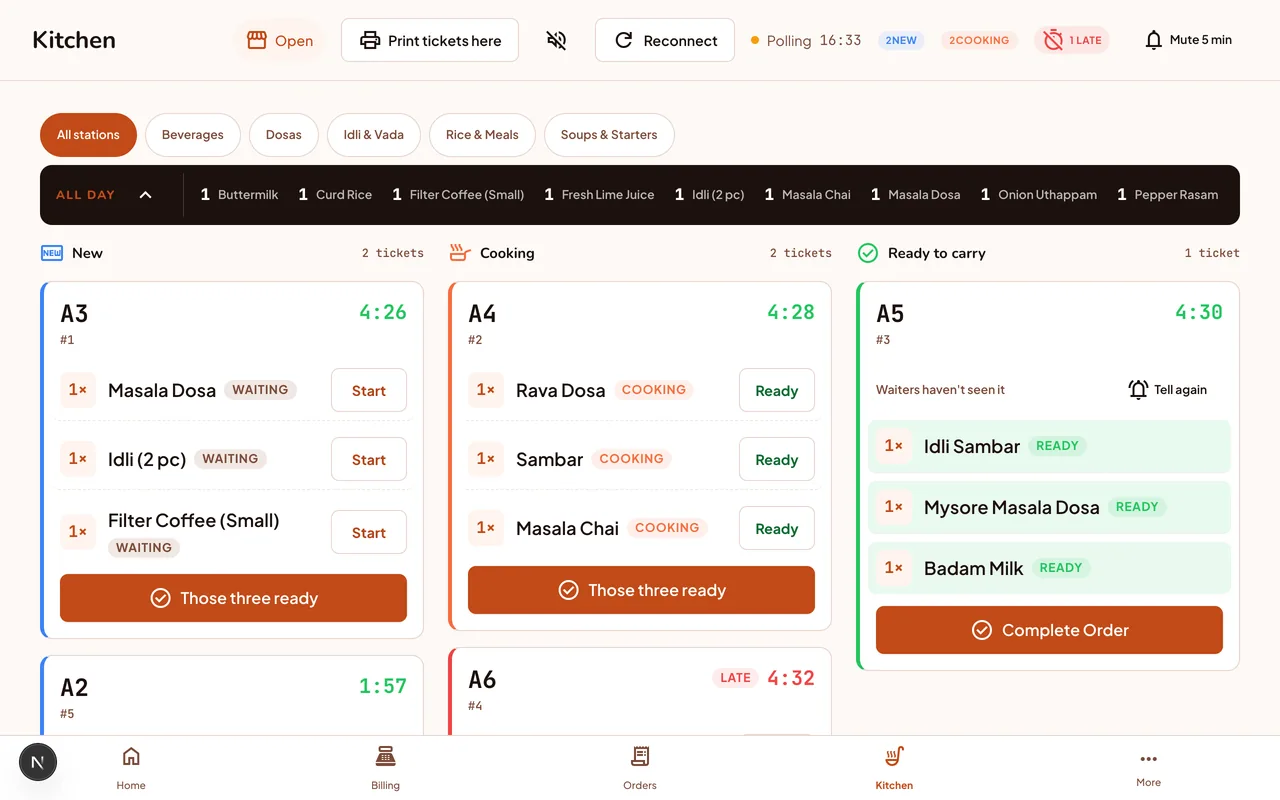
A kitchen display system is a screen that replaces paper tickets and shouting. Every accepted order appears with its table, dishes, notes and a running timer.
Servly’s kitchen screen opens on any device with a browser. Every staff role can open it.
A diner scans the QR code at the table, browses your menu and confirms the order. Or your staff enter it through the dashboard.
Staff accept each order first, unless you switch on auto-accept. It then appears on the kitchen screen with the table number, the dishes and any special instructions. Turn on sound and a chime plays for each new order.
With one tap per dish, the kitchen moves it from New to Cooking. A timer shows how long the order has been waiting.
The kitchen taps each dish Ready and it shows on the waiter’s ready-to-carry list. Serving at the table is a staff action: the kitchen screen never completes or pays an order.
Everything your kitchen needs to stay readable during the busiest hour.
Every accepted order appears on the screen, in the order it arrived, so the kitchen always knows what to cook next.
Each order card shows a running timer. Each dish has its own cook time: once a dish runs past it, the card turns red and shows the word LATE.
When the kitchen marks a dish ready, it shows on the waiter’s phone in a ready-to-carry list. Nothing to shout across the pass.
Items from the same table are grouped into one card, with the round still to cook on top, so a table’s food can come out together.
See how many of each dish are still to cook across all open orders, and filter the list by menu section.
Turn on sound and a chime plays when a new order or new items arrive. While any dish is late, a second alarm repeats every 90 seconds until someone mutes it.
Many tables, many rounds. Each table’s order stays on one card, with the round still to cook on top, so a party’s food comes out together.
Speed is everything. Every order sits on one screen with its own timer, and a chime marks each new order, so a busy counter keeps up without adding staff.
Servly runs for food courts too: every accepted order lands on the kitchen screen with its table and timer.
No. The Servly kitchen screen runs on any device with a browser: an old tablet, a phone or a laptop. Servly sells no hardware.
Not yet. Every kitchen screen shows the full board. The all-day list can be filtered by menu section, so each station can see how many of its dishes are still to cook.
The kitchen screen needs internet. If the connection drops, the orders already on screen stay visible, but you cannot update them until it is back. New orders are saved on our server and appear when the screen reconnects.
No. The kitchen screen shows all orders, whether diners placed them through the QR code or your staff entered them in the Servly dashboard. Both feed the same kitchen queue.
No. The kitchen moves each dish through New, Cooking and Ready. Serving at the table is a staff action, and payment closes the order.
The kitchen display is included in the Servly plan at ₹15,000 a year + 18% GST, paid upfront. The first 25 restaurants get a founding discount; contact sales. There are no hardware fees and no per-order charges.
Start with a look
Book a demo and we’ll show you the kitchen screen on a demo restaurant, from the first ticket to Ready. There is no free trial, so you see it first.
Pay, run it in your kitchen, and get all your money back within 14 days of payment if you don't want to continue.
Our team sets up your restaurant on Servly. Paste your menu or upload a CSV, or send us photos and we load it. Servly checks every row before your menu starts taking orders.